D365 Customer Service Unified Routing — In a Nutshell
Just recently, I got this opportunity to demo OTB Queues and Unified Routing features in D365 Customer Service Workspace. With the business case for workshop being “cases lifecycle management”, for B2B after sales & customer service functions, across multiple markets (countries). The objective from workshop was to illustrate this comprehensive “configuration intensive feature”, in the simplest possible way to business stakeholders.
Unified routing, as the word says provisions a central unified way to automate routing of incoming data (records, chats, voice calls etc) from intake to queues, service agents (incl. bots).
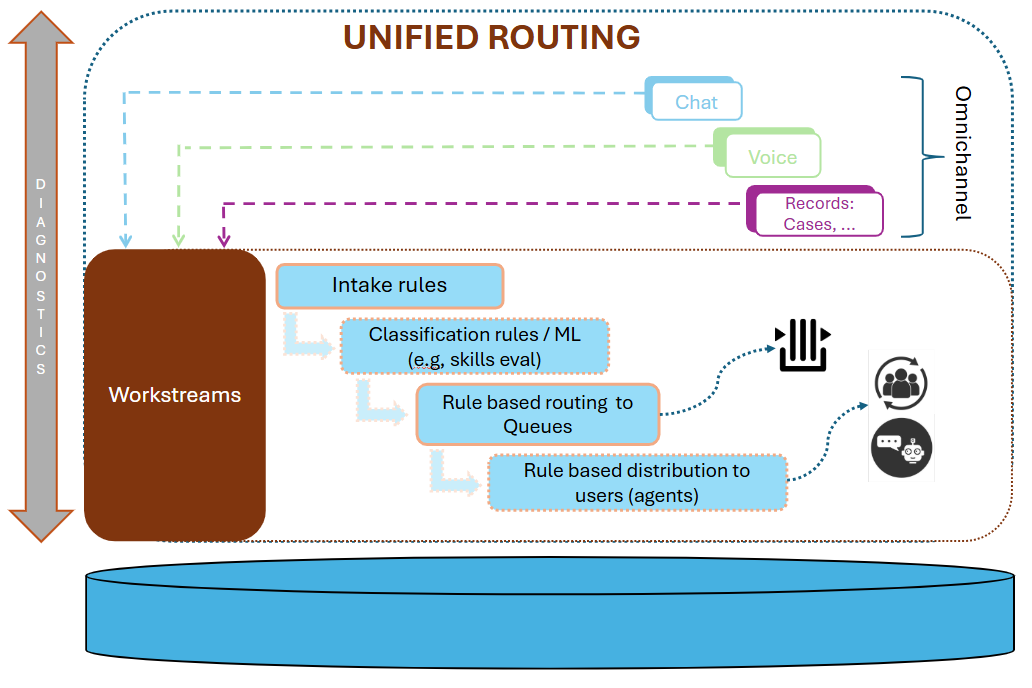
Among the building blocks of D365 Unified Routing, besides the new rolled features, few of the long running matured features are queues and routing rules. For the workshop audience (business stakeholders), to keep it simple, I prepared following slide while complimenting with a simplistic demo using case routing.
I must say, It has been a while since I last worked with OTB features in D365 Customer Service. Last one was back in 2020, and that also with significant customizations and custom integrations using Azure. However, back in the early days of Dynamics CRM on-prem I developed and implemented queues routing using classic workflows and plugins.
So what is this all about
Omnichannel is the name of game from presales to sales to purposeful order tracking to after sales support to customer service
- Supporting customer engagement through all sorts of communication channels is the key to effective business process.
- Increasing volume of inbound traffic from multiple channels require communication to be redirected to right resources (users/bots) for effective handling
“Unified Routing” leverages configurable building blocks to provide a flexible engine to route inbound communication to right resources
Workstreams
https://learn.microsoft.com/en-us/dynamics365/customer-service/administer/create-workstreams
“A workstream is a container to enrich, route, and assign work items, and can be associated with a channel, such as live chat, voice, or case.”
Workstream holds settings / configurations for routing communication / data from a specific channel / source to eventually land in intended queues and handed over to best matching resources
Workstream definition
Following settings are configured in workstream definition
-
Channel: Voice / Messaging / Record (configured for queues)
-
Work distribution mode: To be “Push”-ed to agents or To be “Pick”-ed by agents
-
Fallback queue: default landing queue if routing rules do not resolve to a specific queue
Configurable Building Blocks
- Intake Rules
A query builder like UX to define criteria whether inbound communication / data should be at all processed in the workstream to further be considered for routing. Criteria builder provides querying related records (similar as model driven app views filtering)
- Work Classification
An optional, yet a much value added step to classify inbound work items. Classification is possible using manual or ML/AI based rules builder. This classification helps further down in distributing of work items to the right resources. For example skills based classification from information received in work items and later distribution to resources based on skills matrix.
- Routing to Queues
Yet another query builder like UX to define ruleset / rules on work items data and route to specific queues. Leveraging much familiar filter criteria builder interface, queue routing offers a lean and easy to adapt facility.
- Work Distribution
Settings to identify right resource based on availability & skills,
Settings for blocking and releasing capacity
Application for case routing
After setting up workstream for case routing when a case, based on how it is created, gets either automatically routed or may have to be submitted for manual routing. Though classic routing rules (aka record routing rules) can also perform case routing, unified routing still provisions additional features and serves as “one window” to configure all sorts of routing.
Diagnostics
Provisions a holistic view that shows:
-
Each inbound work item (case etc) into workstreams
-
Which workstream took which work item, due to match on intake rules
-
Routing status
-
Routing start time
-
Duration duration
-
Landing queue
-
Assignment to agent
-
Classification performed
Conclusions
-
Unified routing is offers one way to apply ingest, enrich, enroute and distribute work items being created from different channels
-
Though it is configurations driven engine, it certainly has a need for best clarity of business requirements. This is because queues’ setup, even in a typical SME, comprises of multiple levels based on varied functions and departments.
-
Data quality has an absolute importance as rules engine from intake to routing, thoroughly depend upon trust worthy data.