Allow Graph API Permissions for Azure Managed Identity
During a POC to consume Azure Services from Dataverse Plugins (C#), I needed to allow Entra User Read permissions (i.e, Graph API) to Managed Identity. Found that’s not possible from portal. Typically one would go to Enterprise Applications, remove default filter and search for Managed Identity. Here under Permissions, unlike App Registration, there was no option to set specific permissions.
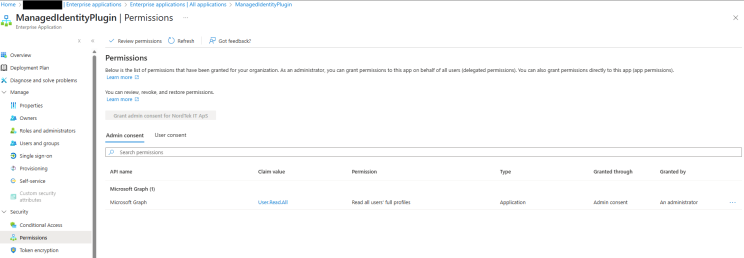
So, with some help from Open AI (improvising my prompt making skills as well :) ), I wrote following 3 step bash script
1- Get Managed Identity SP Id (managed identity name: ManagedIdentityPlugin) <MANAGED_IDENTITY_SP_ID>
az ad sp list --display-name "ManagedIdentityPlugin" --query "[0].id" -o tsv

==>> b18d12d2-8528-4531-92d2-b4bd1e1ca70f
2- Get Graph API SP ID <GRAPH_SP_ID>
az ad sp list --display-name "Microsoft Graph" --query "[0].id" -o tsv

==>> b7357e1e-b58a-40b0-8586-d53555ff1b89
3- Get Graph API App Role for User.Read.All <APP_ROLE_ID>
az rest --method GET --uri "https://graph.microsoft.com/v1.0/servicePrincipals/<GRAPH_SP_ID/appRoles" | jq '.value[] | select(.value == "User.Read.All")'

==>> 87d8aada-7df6-4688-a626-7b0498fe9f70
4- POST request to set permission
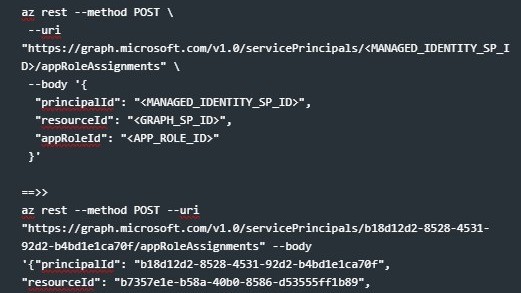
az rest --method POST \
 --uri "https://graph.microsoft.com/v1.0/servicePrincipals/<MANAGED_IDENTITY_SP_ID>/appRoleAssignments" \
 --body '{
  "principalId": "<MANAGED_IDENTITY_SP_ID>",
  "resourceId": "<GRAPH_SP_ID>",
  "appRoleId": "<APP_ROLE_ID>"
 }'

==>>
az rest --method POST --uri "https://graph.microsoft.com/v1.0/servicePrincipals/b18d12d2-8528-4531-92d2-b4bd1e1ca70f/appRoleAssignments" --body
'{"principalId": "b18d12d2-8528-4531-92d2-b4bd1e1ca70f",
"resourceId": "b7357e1e-b58a-40b0-8586-d53555ff1b89",
"appRoleId": "87d8aada-7df6-4688-a626-7b0498fe9f70"}'
And vola !!!