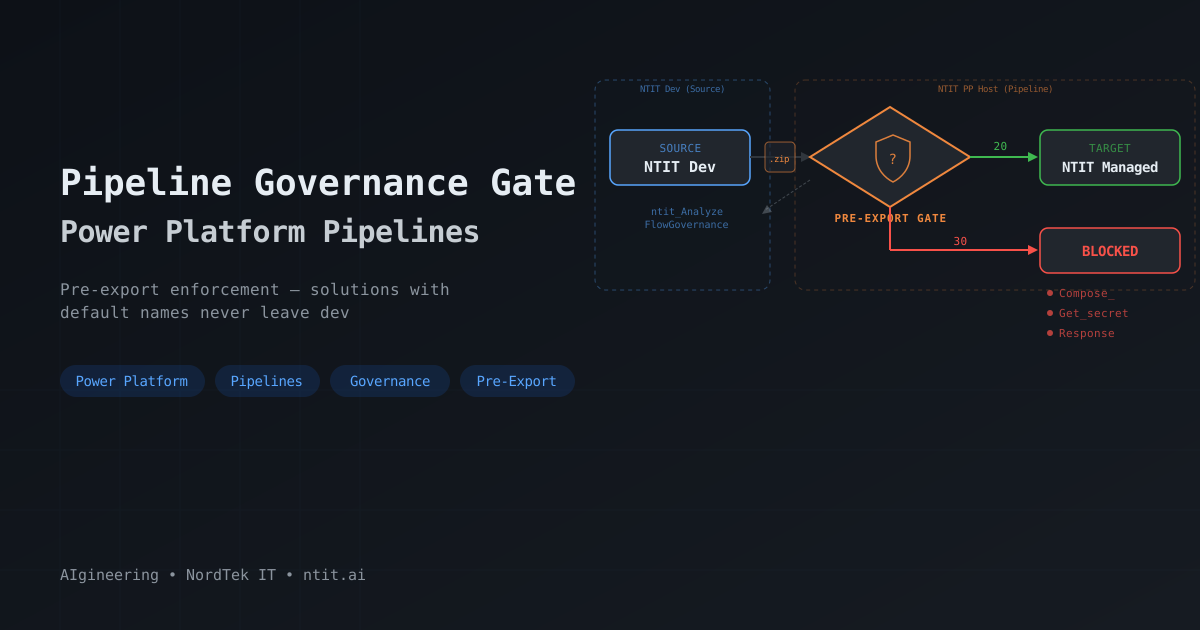
Pipeline Governance Gate: Catching Default Names Before Solutions Leave Dev
In the previous post, I built a custom governance layer that blocks flow activation when actions still have default names. That works great during development — the moment a maker tries to activate a flow, the plugin fires, checks every action, and blocks activation if anything is non-compliant.
But activation enforcement has a gap.
The Gap
When a developer edits a cloud flow that’s already active — adding new actions with default names and saving — the plugin doesn’t trigger. The SetState message only fires when the flow’s state changes (Draft → Activated). Edits to an already-active flow bypass the check entirely.
In practice, this means a flow can pass governance on first activation, then accumulate default-named actions through subsequent edits. And when that solution gets deployed to a higher environment through a pipeline, those non-compliant actions come along for the ride.
The fix: add a deployment gate that checks every flow in a solution before it leaves the source environment.
Power Platform Pipelines — The Three Actors
For a general understanding of Power Platform Pipelines — they’re Microsoft’s built-in mechanism for moving solutions between environments, no external tooling required. A maker opens a solution, clicks Deploy, picks a stage, and goes.
Behind the scenes, three actors are involved:
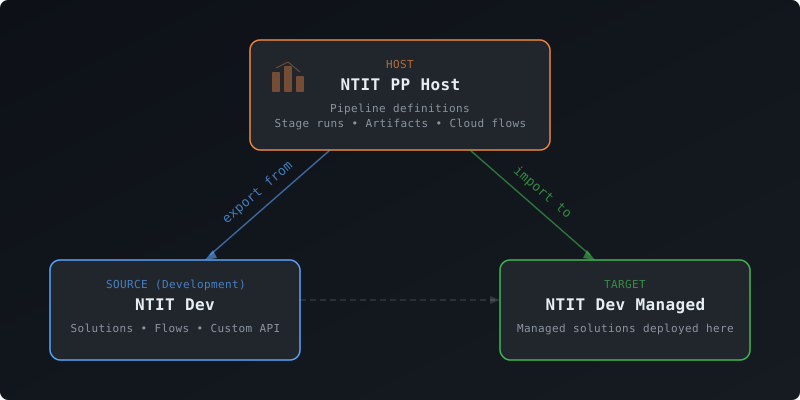
Host — the control tower. Pipeline definitions, artifacts, run history. My governance cloud flow lives here.
Source — where makers build. Solutions exported from here. This is where flows and their action names live. The governance layer is deployed here as a managed solution — its Custom API is the entry point the pipeline calls to check compliance.
Target — where solutions land. Makers don’t need access.
The Cloud Flow
Enable pre-export by setting preexportsteprequired = true on the pipeline stage. The pipeline fires OnDeploymentRequested and pauses — waiting for an event handler — a cloud flow in my case — to pick up, run additional logic, and call UpdatePreExportStepStatus with 20 (proceed) or 30 (reject). That additional logic is where I hook up the Custom API with the SolutionId of the solution about to be exported. Microsoft recommends enabling this only on the first stage — the solution is exported once and reused for subsequent stages.
The governance gate itself is a cloud flow in the host environment:
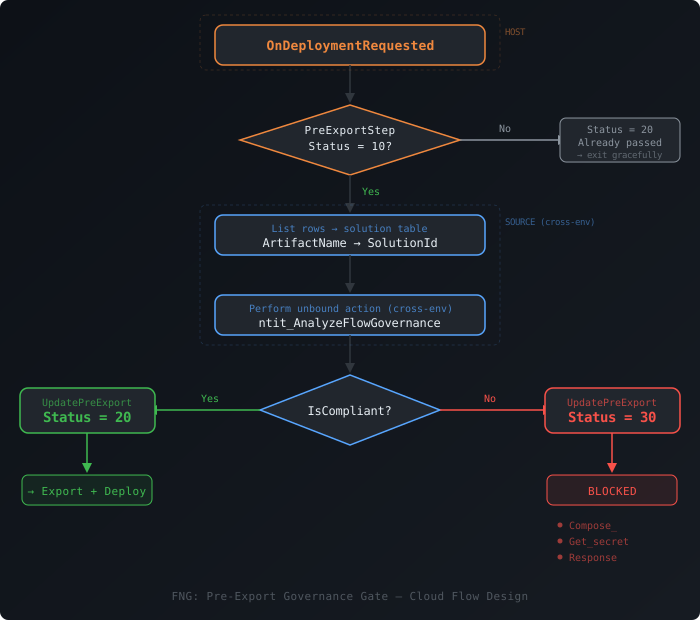
OnDeploymentRequested fires twice per deployment — once when the pipeline enters the pre-export gate (PreExportStepStatus = 10) and again after the gate clears (PreExportStepStatus = 20). This happens even with only the pre-export gate enabled — the event is a lifecycle hook, not a one-shot trigger.
The first decision checks PreExportStepStatus: if it’s 10, run the governance check. If it’s 20, the gate already passed — exit gracefully.
When at the pre-export gate, the flow resolves the solution’s ArtifactName (from OutputParameters) to a SolutionId via a cross-environment lookup, then calls ntit_AnalyzeFlowGovernance in the source environment with TriggeredBy = "Pipeline". Based on the result, it calls UpdatePreExportStepStatus with 20 (proceed) or 30 (reject).
A few things to watch:
| Parameter | Location | Why It Matters |
|---|---|---|
StageRunId | InputParameters | Needed for the approve/reject callback |
PreExportStepStatus | InputParameters | 10 = waiting at pre-export gate — check this first |
ArtifactName | OutputParameters | Solution unique name — resolve to GUID |
The split between InputParameters and OutputParameters isn’t intuitive — if your flow doesn’t work, check you’re reading from the right parent object.
triggerOutputs()?['body/InputParameters/StageRunId']
triggerOutputs()?['body/InputParameters/PreExportStepStatus']
triggerOutputs()?['body/OutputParameters/ArtifactName']
Activation + Pipeline — The Full Safety Net
With the pipeline gate in place, the governance layer now covers two critical moments:
| When | What Triggers | What It Catches |
|---|---|---|
| Developer activates a flow | SetState plugin | Default names on first activation |
| Solution deployed via pipeline | Pre-export cloud flow | Default names that slipped in through edits to active flows |
The activation check gives immediate feedback — fix it now. The pipeline check is the safety net — nothing non-compliant reaches higher environments.
The Three Gated Extensions
Pipelines support three customization points — places where you can insert your own logic:
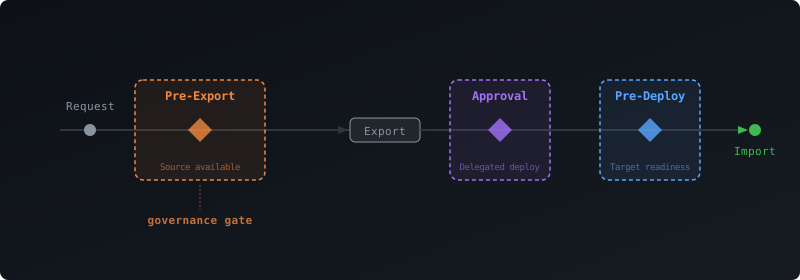
| Gate | When It Fires | Can Query Source? | Maker-Visible Comments? |
|---|---|---|---|
| Pre-export | Before solution export | Yes — solution still in dev | No (preexportproperties is admin-only) |
| Delegated deployment | After export, during approval | No | Yes (approvalcomments) |
| Pre-deployment | After export + approval, before import | No | Yes (predeploymentstepnotes) |
The critical distinction: pre-export fires while the solution is still in the source environment. The flow definitions haven’t been packaged yet. You can still read the clientdata column on the workflow table — which is exactly what my Custom API does.
Pre-deployment fires after the solution has already been exported and approved. The artifact is sealed. You can’t inspect flow definitions anymore.
For governance checks on flow content, pre-export is the only viable gate.
When predeploymentsteprequired is also enabled, the pipeline fires a separate event — OnPreDeploymentStarted — after export and approval. This is where approval emails, final sign-offs, or change management gates belong. A different cloud flow handles this event and calls UpdatePreDeploymentStepStatus with 20 (proceed) or 30 (reject).
The Gotchas
UpdatePreExportStepStatus ≠ UpdatePreDeploymentStepStatus. Both accept a StageRunId and a status value. Both return HTTP 200 regardless of whether they did anything useful. But they target different gates. Call the wrong one and the pipeline silently stalls — still waiting for an answer that never comes. This happened during my implementation: I called UpdatePreDeploymentStepStatus, got a 200, and spent time debugging why the pipeline wasn’t progressing.
preexportproperties is admin-only. When a deployment is rejected, the maker sees a generic “The pre-export step failed.” — no details. The violation data is written to preexportproperties on the deploymentstagerun record, but that’s only visible in the host environment. Workaround: add a Teams or email notification on the reject branch with the specific violations.
Cross-environment connections. The cloud flow lives in the host but queries and calls APIs in the source. Use the “from selected environment” variants of the Dataverse connector — they handle routing transparently. Ensure the connection identity has privileges in the source environment.
End-to-End
Compliant: Maker clicks Deploy → cloud flow checks all flows → Status = 20 → pipeline exports and imports to target. Tracking table logs TriggeredBy = "Pipeline", IsCompliant = true.
Non-compliant: Maker clicks Deploy → cloud flow finds violations → Status = 30 → pipeline fails, solution never leaves dev. Tracking table logs the violations. Optional Teams/email notification tells the maker exactly which actions need renaming.
Once a solution passes and is exported, the artifact is immutable — what passed governance in dev is exactly what gets deployed to subsequent stages.
Non-compliant solution rejected at the pre-export gate, then fixed and re-deployed successfully:
What’s Next
This is the second post in a series on enforcing governance across deployment mechanisms. The Custom API at the center is the same — what changes is how it gets called:
- Part 1: Activation enforcement — Dataverse plugin, real-time blocking
- Part 2: Pipeline governance gate (this post) — Power Platform Pipelines, pre-export gated extension
- Part 3: Azure DevOps CI/CD — PowerShell task calling the Custom API post-import (coming soon)
- Part 4: GitHub Actions — same concept, different orchestrator (coming soon)
The pattern is consistent: one Custom API, multiple trigger points. Build the detection engine once, wire it into every deployment path your organization uses.
This article is part of a series on Power Platform governance. See the teaser post that started it all, and Part 1 for the full technical walkthrough of the governance engine.
#PowerPlatform #PowerAutomate #Pipelines #Governance #Dataverse #CustomAPI #ProDev #ALM #NordTekIT