Query the PrincipalObjectAccess Table Using AI Agents — Locally, Inside XrmToolBox
The PrincipalObjectAccess table is where Dataverse tracks every record share — who has access to what, with which rights, through which mechanism. It is one of the most useful tables for security auditing, and one of the least accessible.
Search POA Landscape — an XrmToolBox plugin I first shipped in 2017 — now lets you query that table using plain English, through any AI agent that speaks MCP. This is the short version — for the full technical deep dive, see Search POA Landscape Meets MCP.
How it works
The plugin embeds an MCP server inside XrmToolBox. Start the plugin, click Start MCP, and a local endpoint goes live at http://localhost:5580/mcp. Point any MCP-compliant AI client at it — Claude Code, GitHub Copilot, Codex, or any other — and start asking questions.
No cloud services. No external APIs. Your Dataverse connection stays local, inside XrmToolBox.
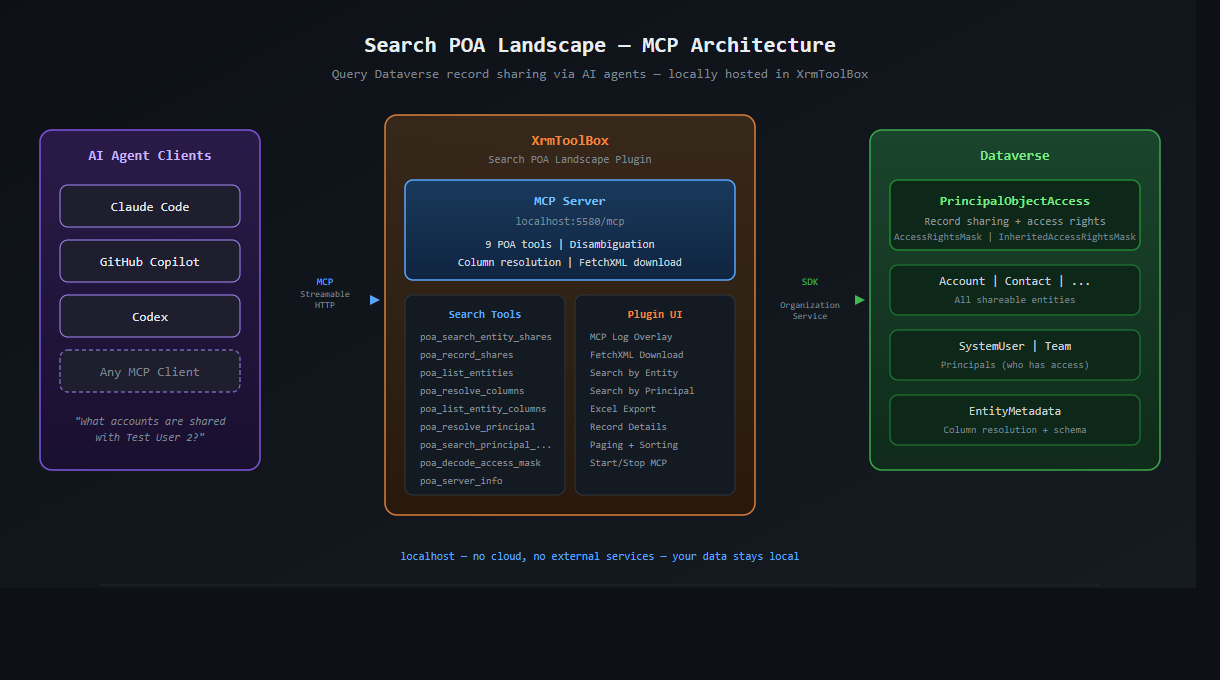
What you can ask
The server exposes nine POA tools. You don’t need to know any of them by name — just ask:
“What account records are shared with Test User 2?”
The agent resolves the user name to a GUID, picks the right tool, runs the query, and returns a table. No FetchXML, no GUIDs, no knowledge of the POA schema required.
A few more examples:
“Show me all shared opportunities with name and email”
“Who has access to this record?” (pass the GUID)
“List every entity type that has shared records for the Sales team”
If your query hits ambiguity — like asking for “phone number” when the entity has nine phone-related columns — the server tells the agent to ask you which one to use, instead of guessing. That rule is encoded server-side, so it works across every client automatically.
FetchXML for every query
Every query the agent runs gets a download button in the log overlay. Click it and you get the exact FetchXML — cleaned of paging attributes, ready to paste into FetchXML Builder. Useful for learning what the tools build, or for handing a query off to a colleague who prefers FXB.
Try it
v1.2026.4.15 is live on nuget.org. Install via the XrmToolBox Plugin Store (search POA), connect to a Dataverse environment, and click Start.
For the full technical deep dive — tool list, disambiguation design, cross-client testing, session lifecycle differences — see the detailed write-up: Search POA Landscape Meets MCP.
#PowerPlatform #Dataverse #XrmToolBox #MCP #ProDev #AIgineering #NordTekIT