The Managed Solution Trap: Fixing Column Prefix Mistakes in Dataverse
The Problem
5 columns deployed to TEST with the wrong prefix (crf83_ instead of acme_) as part of a managed solution. The impact ripples across forms, views, CIJ segments, plugins, JS, Power Automate, APIs, and Actions.
When columns with the wrong prefix are deployed as managed:
- Can’t rename columns — schema names are permanent
- Can’t just delete — managed solution controls them
- Data already exists in those columns
- Dependencies exist across forms, views, segments, and code
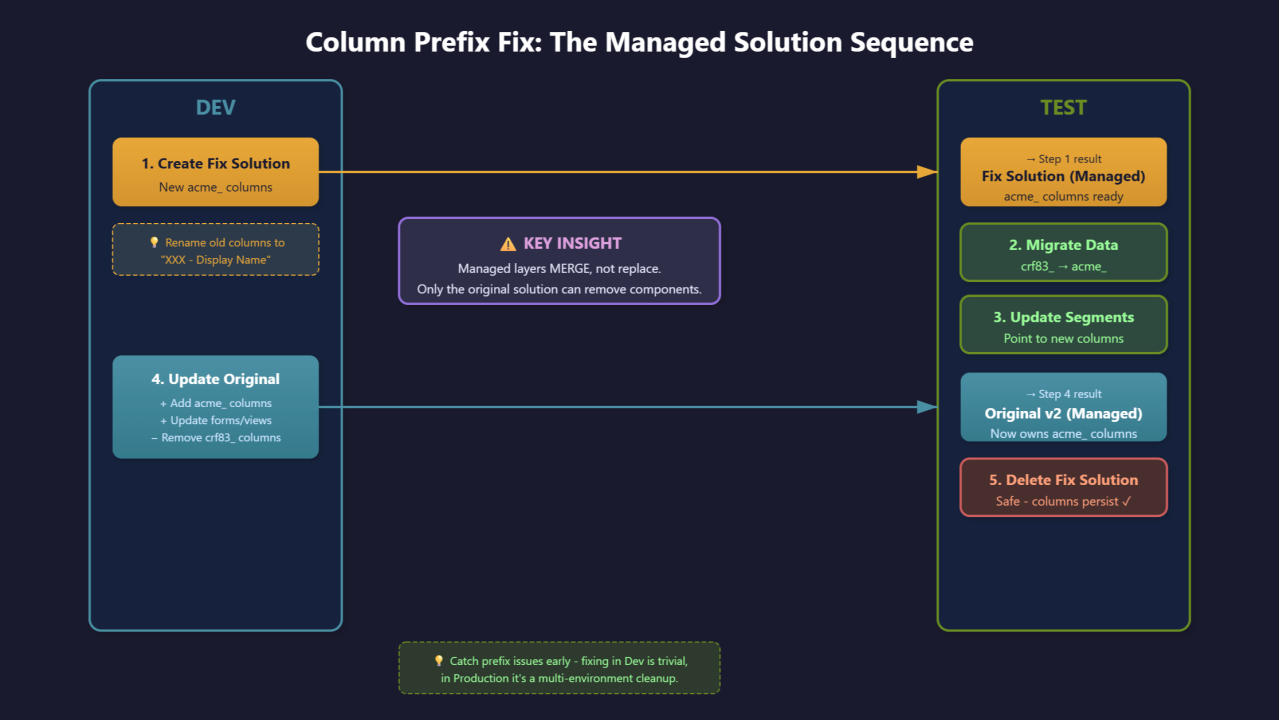
Key Insight: Managed Layers Merge, Not Replace
When I tried creating a “fix” solution with correct columns and updated forms, then imported to TEST — both old and new columns appeared on the form.
Dataverse merges managed layers. To actually remove something from a form/view, you must update the solution that originally added it.

The Five-Step Recovery
Step 1: Import Temporary Fix Solution
Create a small solution in Dev with just the new acme_ columns. Import to TEST as managed. This gives a target for data migration.
Tip: Rename old columns to "XXX - Column Display Name" so it’s obvious which is which when updating forms, views, and segments.
Step 2: Migrate Data in TEST
Run a script or Flow to copy values from crf83_ to acme_ columns. Verify before moving on.
Step 3: Update Segments (CI-J Specific)
Check Segment Builder for any segments using the old columns. Recreate or update them to point to the new schema.
Step 4: Update the Original Solution
Back in Dev, modify the original solution:
- Add the new
acme_columns - Update forms/views (remove old, add new)
- Remove the old
crf83_columns - Bump the version
Export as managed and import to TEST. This is what actually removes the old columns.
Step 5: Delete Temporary Fix Solution
Now safe to delete. The new columns persist because the original solution owns them.
Key Takeaways
- Managed layers merge, not replace — removals must come from the original solution
- Schema names are permanent — you can’t rename, only migrate
- First-party apps add complexity — segments, journeys, and analytics may reference your columns
- Order matters — new columns must have a permanent owner before deleting the temp solution
- Components persist across solutions — removing one solution doesn’t delete the component if another solution still contains it
- Catch issues early — fixing in Dev is trivial, but once it spreads to UAT and Production, you’re multiplying cleanup effort across every environment