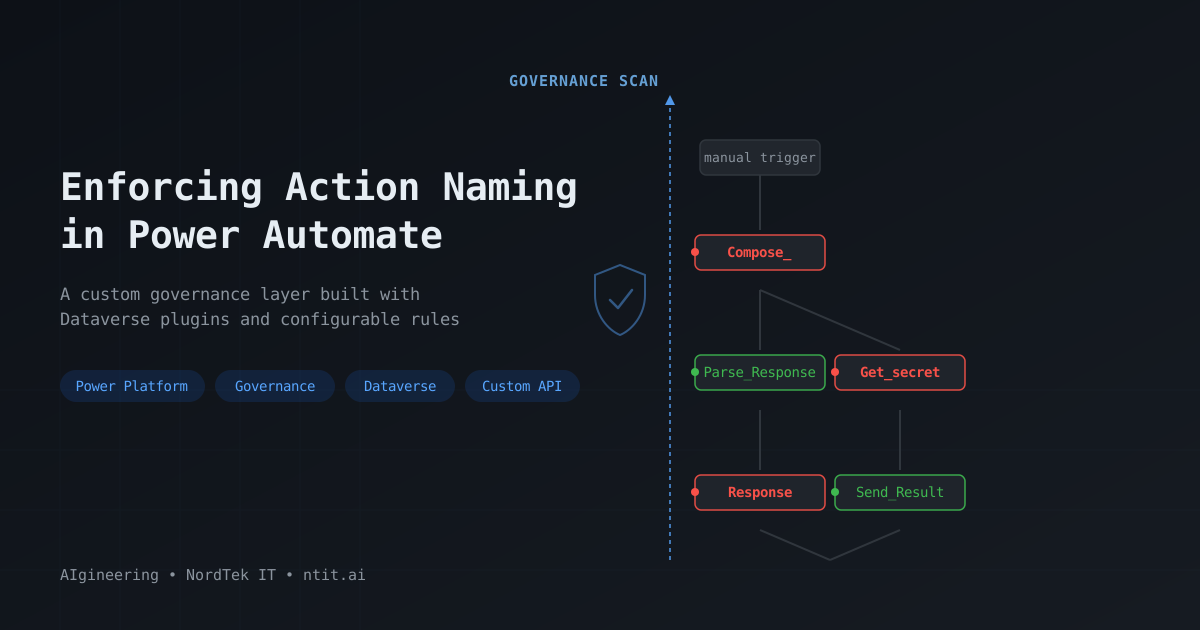
Enforcing Action Naming Conventions in Power Automate
In a previous post, I teased a late-night build session — a custom governance layer for the Power Platform ecosystem. This is the full technical walkthrough of what came out of that session — and the next day.
The Business Case Nobody Makes
Every Power Platform consultant has inherited a flow that looks like this:
Compose → Condition → Apply_to_each → Get_items → Compose_2 → Update_a_row → Compose_3
It works. It runs. It does the job. And six months later, when something breaks at 2 AM, whoever picks up that flow has no idea what Compose_3 does without clicking into every single action.
This isn’t a functional problem — the flow works fine. It’s a technical debt problem, and it compounds:
- Onboarding new team members takes longer because every flow is a puzzle
- Troubleshooting run history becomes guesswork — which
Composefailed? - Code reviews become superficial because reviewers can’t follow the logic at a glance
- Handovers between consultants require hours of “let me walk you through this”
In consulting environments, where developers rotate between projects and clients, this debt hits especially hard. You’re not just maintaining your own flows — you’re maintaining flows built by people who’ve already moved on.
The fix is obvious: rename your actions. But “obvious” doesn’t mean “enforced.”
What Exists Today
If you go looking for tooling to enforce action naming, you won’t find much.
Platform Features
Microsoft offers nothing built-in for action naming governance. The Power Platform ecosystem has:
- Solution Checker — validates code, security roles, web resources. Does not inspect flow action names.
- Copilot in Power Automate — does not suggest renaming actions.
- Power Platform Pipelines — moves solutions between environments. No pre-deployment quality gates for flow content.
Community Tools
| Tool | What It Does | Gap |
|---|---|---|
| Power CAT Code Review Tool (Microsoft) | Has a patternCheckConsistentNaming rule | Post-hoc only — upload a zip, get a report. No deployment gate. |
| Automate The Mundane (Ed Williams) | Pipeline gate using 3 flows + XPath | Heavy setup, only 2 rules, fragile |
| ITAintBoring PowerShell | Bulk-renames actions in exported solutions | Renames for you — doesn’t enforce |
XrmToolBox
No plugin in XrmToolBox addresses flow action naming. The Custom API Tester can invoke governance APIs once built, but there’s nothing out of the box for detecting default names.
Bottom line: If you want enforcement at development time — when a maker tries to activate a flow — you’re building it yourself.
The Pain Point
Let me make this concrete. Here’s what default action names look like in a real flow definition (the clientdata JSON stored in Dataverse):
{
  "actions": {
    "Compose_": { "type": "Compose", ... },
    "Get_secret": { "type": "OpenApiConnection", ... },
    "Invoke_an_HTTP_request": { "type": "OpenApiConnection", ... },
    "Response": { "type": "Response", ... },
    "Compose_xyz": { "type": "Compose", ... }
  }
}
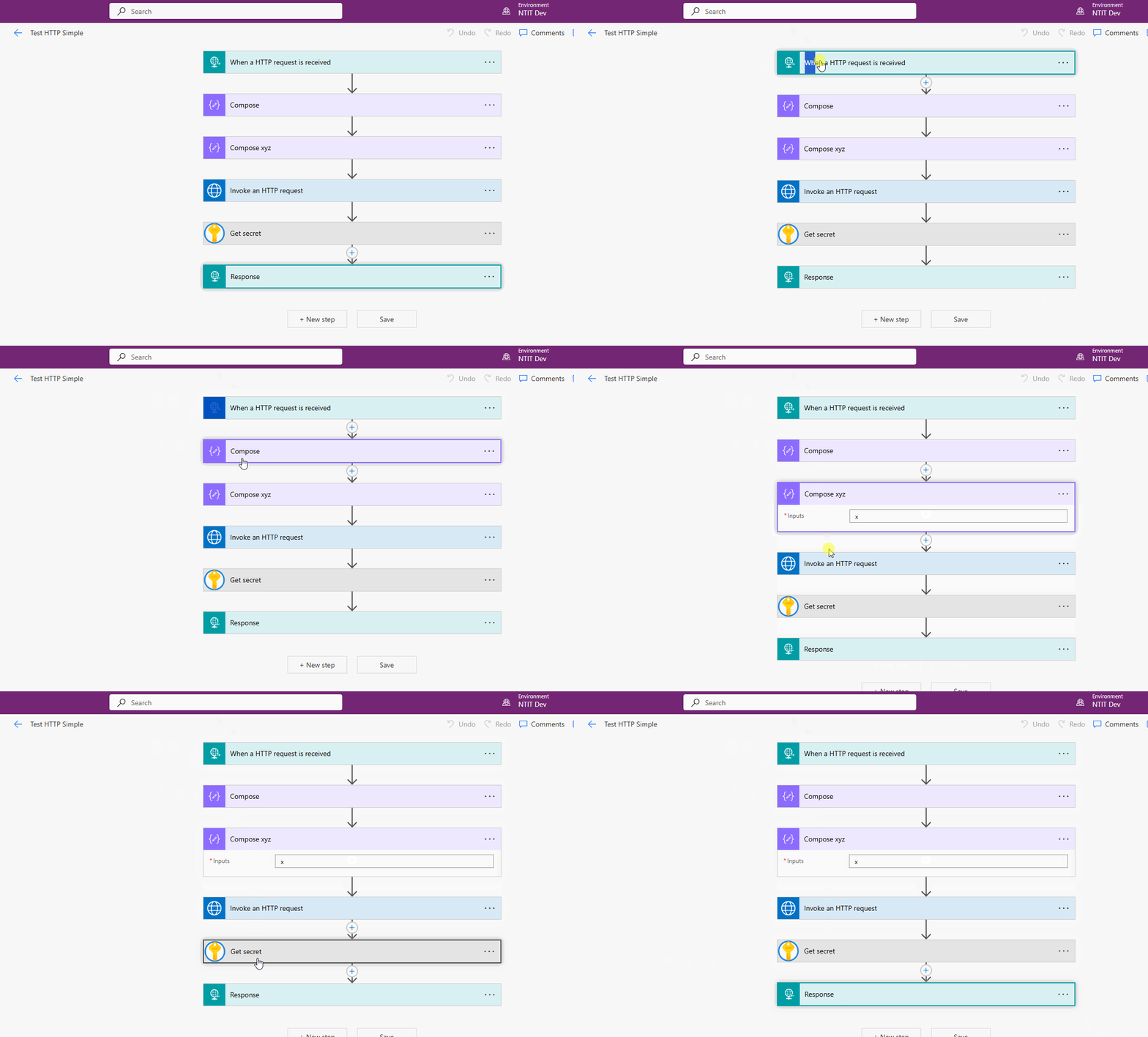
Four of these five actions have default names — the platform generated them automatically. Only Compose_xyz was renamed by the developer (barely).
The problem gets worse with scale. A flow with 30 actions where 20 have default names is essentially unreadable without clicking into each one. And every connector generates its own default pattern — Get_items, Add_a_new_row, Send_an_email_(V2), List_rows — all perfectly functional, all perfectly opaque.
A flow with five actions — four still have platform-generated default names. At a glance, you can’t tell what any of them do without clicking into each one.
The Approach
Instead of building a standalone tool, I wanted something that lives inside the platform — a governance layer that:
- Runs automatically when a developer activates a flow
- Blocks activation if default names are detected
- Tells the developer exactly which actions need renaming
- Stores results for visibility and dashboards
- Can also run at pipeline time to gate deployments
The solution is a Dataverse plugin package with a Custom API, backed by configurable detection rules stored in a Dataverse table.
Data Model
Two custom tables in the FlowGovernance solution:
Governance Rules (ntit_governancerule) — configurable detection patterns:
| Column | Purpose |
|---|---|
| Name | Human-readable label (e.g., “Compose”) |
| Rule Type | Regex or OperationId |
| Pattern | The regex pattern or operationId value |
| Is Active | Toggle rules on/off without deleting |
| Description | What this rule catches |
This is where the 27 built-in patterns live — ^Compose(_\d*)?$, ^Condition(_\d*)?$, etc. — all manageable through a model-driven app without redeploying code.
Governance Results (ntit_flowgovernanceresult) — audit trail:
| Column | Purpose |
|---|---|
| Flow Name | Which flow was checked |
| Is Compliant | Pass/fail |
| Violation Count | How many default names found |
| Violations JSON | Detailed per-action results |
| Validated On | Timestamp |
| Triggered By | SetState, Pipeline, or Manual |
Options I Reviewed
Before landing on the current design, I explored several approaches:
| Approach | Verdict | Why |
|---|---|---|
| Recursive child flows | Rejected | Spawns too many flow instances — one per action to check |
| Azure Function | Rejected | Adds Azure dependency; goal was a pure Dataverse solution |
| String parsing in flow expressions | Rejected | Fragile; can’t distinguish action names from other JSON keys |
| Cloud flow calling itself | Rejected | Can’t recursively parse nested JSON (Condition → ForEach → Scope) |
| Custom API + C# Plugin | Selected | No Azure dependency, ships as a Dataverse solution, handles recursive JSON natively |
The clientdata column on the workflow table contains the full flow definition JSON — no need for the Management Connector or external APIs.
The Three-Layer Architecture
The solution separates concerns into three distinct layers:
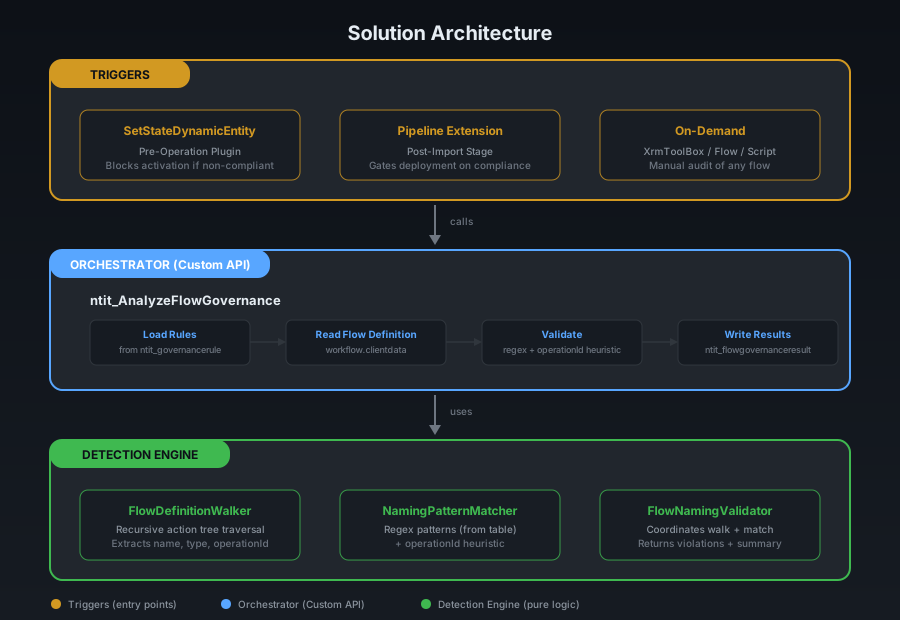
Detection Engine (bottom layer) — pure C# logic with no Dataverse dependencies:
- FlowDefinitionWalker recursively traverses the action tree, handling Condition branches, ForEach loops, Switch cases, Scope blocks, and Until loops. For each action, it extracts the name, type, and
operationId(frominputs.hostfor connector actions). - NamingPatternMatcher runs two detection strategies:
- Regex patterns loaded from the rules table — catches built-in actions like
Compose,Condition,Apply_to_each - OperationId heuristic — for connector actions, PascalCase-splits the operationId (e.g.,
GetSecret→ [“Get”, “Secret”]) and checks if those words appear as an ordered subsequence in the action name. This catchesGet_secret,Invoke_an_HTTP_request, and similar connector defaults without needing a hardcoded entry for every connector.
- Regex patterns loaded from the rules table — catches built-in actions like
- FlowNamingValidator coordinates the walk and match, producing a summary with violation details.
Orchestrator (middle layer) — a Dataverse Custom API (ntit_AnalyzeFlowGovernance):
- Accepts a
FlowId(single flow) orSolutionId(all flows in a solution) - Loads active rules from the governance rules table (cached in-memory for 5 minutes)
- Reads the
clientdatafrom the workflow table - Calls the detection engine
- Writes results to the tracking table
- Returns compliance status and per-flow results
Triggers (top layer) — three entry points:
- SetStateDynamicEntity plugin — fires automatically when a flow’s state changes to Activated. Runs as a synchronous pre-operation step, calling the orchestrator via
ExecuteMultipleRequest(separate transaction so tracking records persist even when activation is blocked). If non-compliant, throwsInvalidPluginExecutionExceptionwith a human-readable list of actions that need renaming. - Pipeline extension — a PowerShell task in Azure DevOps calls the Custom API with a
SolutionIdafter solution import. If any flow is non-compliant, the pipeline fails with details. - On-demand — call the API manually from XrmToolBox, a Power Automate flow, or any script.
Default Name Detection — The Tricky Part
The hardcoded regex approach works well for built-in actions — there are about 25 of them, and their default names are predictable (Compose, Condition, Apply_to_each, etc.).
But connector actions are different. Every connector generates its own default names from its display name (the Swagger summary field), and there are hundreds of connectors. You can’t hardcode them all.
The key insight: the flow definition JSON contains the operationId for every connector action. While the operationId isn’t identical to the default name, it’s related:
| operationId | Default Action Name |
|---|---|
GetSecret | Get_secret |
InvokeHttp | Invoke_an_HTTP_request |
SendEmailV2 | Send_an_email_(V2) |
The heuristic splits the operationId by PascalCase boundaries, removes filler words (a, an, the, to, for) from the action name, and checks if the operationId words appear in order. A coverage threshold prevents false positives — if the action name has too many extra words beyond what the operationId accounts for, the developer probably renamed it intentionally.
Pipeline Integration
The same Custom API that powers real-time enforcement also serves as a deployment gate:
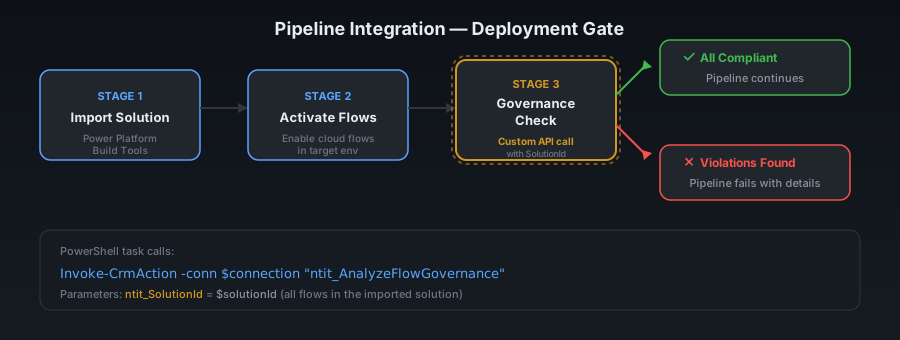
After solution import and flow activation, a PowerShell task calls the Custom API with the solution’s GUID. The API analyzes every Modern Flow in the solution and returns aggregate results. If any flow is non-compliant, the pipeline stage fails — preventing ungovernanced flows from reaching higher environments.
This gives teams two enforcement points: development time (immediate feedback when activating) and deployment time (pipeline gate).
What the Developer Sees
When a developer tries to activate a flow with default action names, they get an immediate, clear error:
Flow 'Test HTTP Simple' cannot be activated — actions still have default names:
  Compose_
  Response
  Invoke_an_HTTP_request
  Get_secret
Please rename these actions before activating.
The full governance loop: activation blocked → error with action names listed → results logged in the tracking table → developer renames actions → activation succeeds. The rules table shows how patterns are configurable without redeploying code.
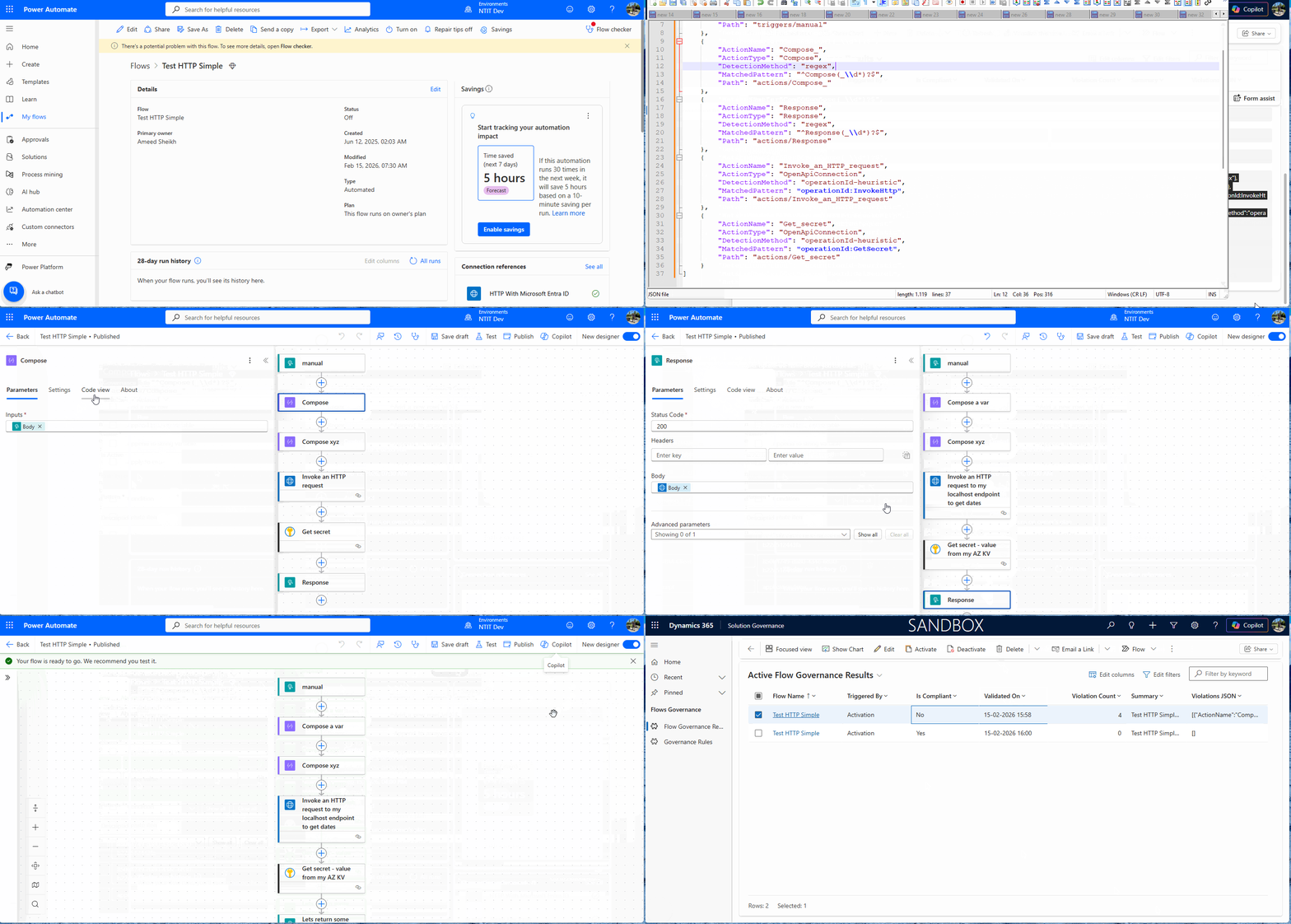
No guessing. No checking a report after the fact. The feedback loop is instant.
The Known Gap: Editing Active Flows
There’s one scenario this doesn’t cover yet, and it’s worth being transparent about.
When a developer edits a cloud flow that’s already active — adding new actions with default names and saving — our plugin doesn’t trigger. The Update message on the workflow table has IsEvent=False in Dataverse, meaning no plugin or event can fire on it. The governance check only runs when the flow’s state changes (Draft → Activated).
In practice, this means:
- First activation — fully governed, must pass naming check
- Subsequent edits while active — not caught in real-time
- Pipeline deployment — caught again (the pipeline gate checks all flows regardless of state)
The pipeline gate is the safety net here. Any flow that slips through during development will still be caught at deployment time. For teams that want tighter control, a scheduled scan (calling the Custom API periodically) is another option.
This is a platform limitation, not a design choice. If Microsoft ever enables events on the Update message for the workflow table, we can close this gap immediately.
What’s Next
This is deployed and running in our development environment. The immediate roadmap:
- Pipeline extension flow — integrate with Azure DevOps Pipelines as a deployment gate. The same Custom API that powers real-time enforcement also serves as a deployment gate — I’ll cover the full pipeline integration in a dedicated follow-up post.
- Exemption mechanism — allow specific flows to bypass governance (prototypes, temporary flows)
- Severity levels — warning vs. blocking (some teams may want to log without blocking)
The governance rules table means any team can customize their standards without touching code. Add a regex for your custom connector’s default name, toggle a rule off for a pattern your team allows — it’s all configuration.
Key Takeaway
Default action names are the silent technical debt of the Power Platform. They don’t break anything today — they break everything six months from now.
The platform won’t enforce naming standards for you. But with a Custom API, a Dataverse plugin, and a table of configurable rules, you can build enforcement that lives inside the platform and triggers exactly when it matters — at the moment a developer tries to ship their work.
This article is part of a series on Power Platform governance. The teaser post captures the spirit of the late-night build session that started it all.
#PowerPlatform #PowerAutomate #Dataverse #Governance #CustomAPI #ProDev #TechnicalDebt #NamingConventions #CSharp #NordTekIT