From Stateless Tool to Cognitive Partner
How I built an AI-augmented workspace — and why “design for continuity” makes a punching productivity boost
The Moment It Clicked
I was using AI the way most people do: open chat, ask question, get answer, close tab. Repeat tomorrow with zero memory of yesterday. It worked. Sort of.
But every conversation started from almost scratch. Re-explaining my project. Re-stating my preferences. Re-building context that vanished the moment I closed the browser or luckily if i could locate the saved chat later from tens (if not hundreds).
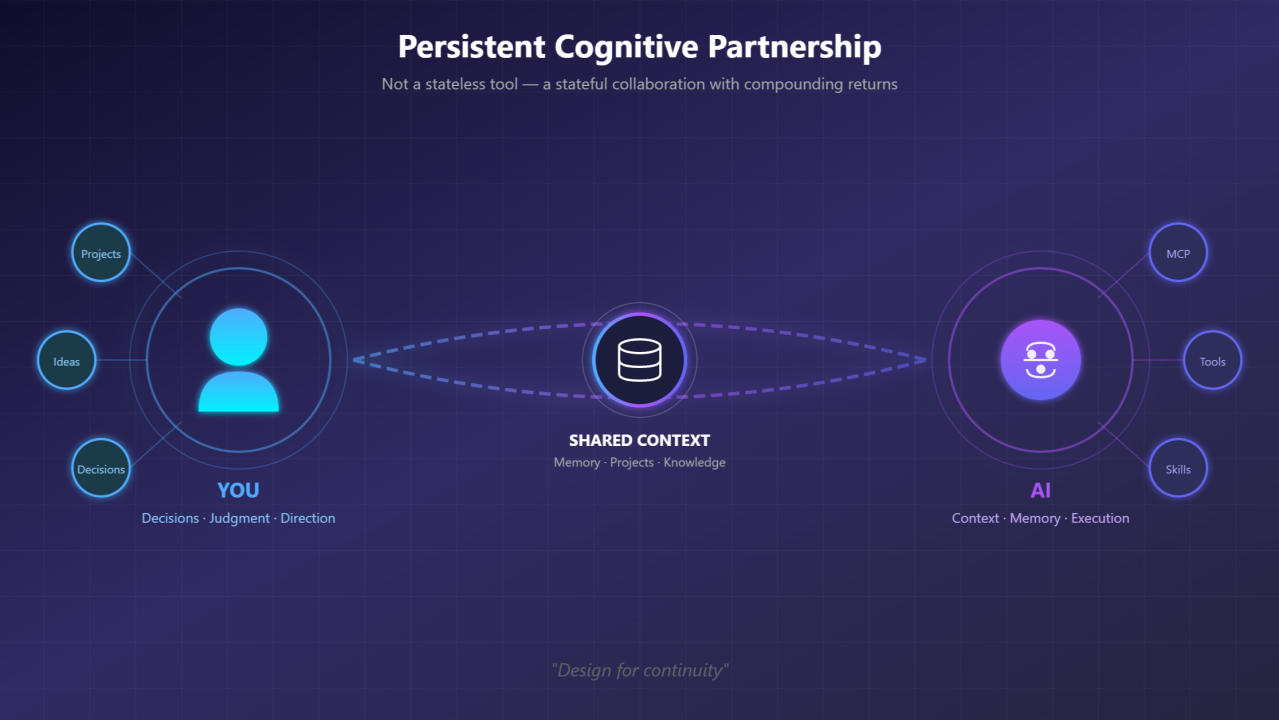
Then I started asking a different question. What if AI wasn’t just a tool I used, but a partner I worked with? What would that even look like?
I explored this through conversations — with peers, with friends, and crucially, with the AI itself. The irony isn’t lost on me: I used AI to figure out how to work with AI. The methodology emerged from the collaboration it was designed to enable.
The Challenge with Stateless AI
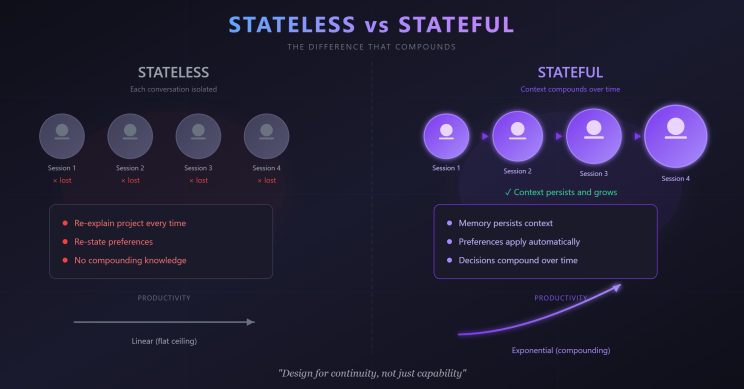
Most AI interactions are stateless — each conversation exists in isolation.
You explain your project. Again.
You correct the documentation formats. Again.
You provide background on your client. Again.
This isn’t the AI’s fault. It’s a design challenge. We’re treating a potential partnership like a vending machine.
The real cost isn’t the repetition — it’s the ceiling. Stateless interactions cap out at what you can fit in a single conversation. No compounding. No accumulated understanding. No leverage over time.
What I Built Instead
What emerged is something I now call an AI-augmented workspace. Here’s what it looks like:
Persistent Memory Markdown files that capture context: active projects, key decisions, client details, technical choices. When I start a session, the AI reads these files and knows where we are.
Structured Work Areas Different folders for different work types — owned projects, client engagements, experimental ideas, published knowledge. The structure itself communicates intent.
Protocols & Preferences Documents, Presentations and Date formats. Naming conventions. How I like documents structured. Captured once, applied consistently. No more “actually, I prefer it this way.”
Accumulated Tools Reusable automations that emerged from repetitive tasks. Instead of explaining the same workflow repeatedly, it becomes a command.
Recovery Mechanisms Crash-proof memory. If a session ends unexpectedly, the context survives. No lost work, no lost train of thought.
The Shift: From “Using AI” to “Working With AI”
Here’s how I think about it: an LLM is like a supernaturally clever kid — picks up concepts blazingly fast, connects dots you didn’t see, generates ideas on demand. But it still needs reminders. Still needs a mentor to keep correcting its direction. That mentor is you. Without structure, it drifts. With structure, it compounds. The difference is subtle but profound:
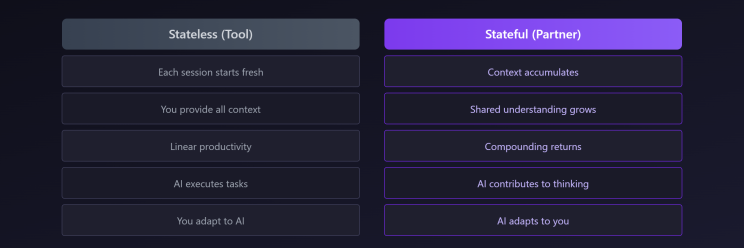
The AI becomes less like a search engine and more like a colleague who’s been on the project from day one.
But here’s what doesn’t change: you’re still in the driver’s seat.
Nothing moves forward without your approval. You must understand what’s being produced. You own what you deliver. This isn’t about blindly trusting AI output — it’s about trust with vigilance.
AI accelerates, but you steer.
It drafts, you decide.
It suggests, you approve.
Human in the loop isn’t a safety checkbox. It’s an architectural demand.
What This Enables
Parallel workstreams without context-switching tax I move between a healthcare compliance project, a customer data enrichment implementation, and experimental tool development. The AI picks up each thread without me re-explaining. In more technical (developer) terms:
- Dataverse solution design with low code model driven apps, while considering licenses cost optimization and choosing addon products from Power Platform. (Here worked as presales and delivery architect, solution design architect, with attention to details for easy to maintain solution for end customer and efforts estimation)
- Lakehouse to Dataverse data flows, consuming external APIs in Function Apps with making unit tests (NO BLIND code copy / paste)
- Local MCP server to help me analyze a specific dataset (Respective PII)
- CI/CD pipelines
Decisions that stick “We decided on 26-Jan to use X approach because Y.” It’s captured. Referenced. Built upon. Not lost in chat history.
Institutional memory for a team of one As an independent consultant, I don’t have colleagues to remember project history. Now I do.
Faster ramp-up after breaks Return from a week away, say “recap yourself,” and get a complete status update. Where we left off. What’s pending. What decisions are open.
The Core Principle: Design for Continuity
If I had to distill this into one idea, it’s this:
Design for continuity, not just capability.
Most AI conversations optimize for the current question. But the real leverage comes from optimizing for the relationship over time.
This means:
- Writing things down (memory files, not just chat)
- Creating structure (folders, conventions, protocols)
- Capturing decisions (not just outputs)
- Building tools for recurring patterns
It’s not about prompting better. It’s about building systems.
Who Is This For?
This approach isn’t for everyone. It’s probably overkill if you:
- Use AI occasionally for one-off questions
- Work on short, isolated tasks
- Have a team that provides continuity
But if you:
- Juggle multiple complex projects
- Work independently or in small teams
- Value consistency and accumulated knowledge
- Think in systems, not just tasks
…then designing for continuity might change how you work — and remember, change is the only constant.
Getting Started
You don’t need to build what I built. Start smaller:
- One memory file. Write down your current project context. Have the AI read it at session start.
- One preference captured. Date format. Terminology. Communication style. Document it once.
- One decision log. When you make a choice, write it down with the rationale. Future-you will thank present-you.
See what compounds. Iterate from there.
The Bigger Picture
I’ve been in tech long enough to remember when AltaVista and Yahoo were how you found things online. Then Google took center stage, and we learned the skill: “how to search”. We got good at crafting queries, filtering results, triangulating answers from multiple sources. Search literacy became second nature.
GenAI, RAG, LLMs — this is another shift. The skill isn’t just searching anymore. It’s more collaborating as well. Structuring. Guiding. And in another decade or two? Something else will emerge that makes today’s methods look as quaint as “Ask Jeeves” (later Ask.com).
The point isn’t to find the “final” way of working. It’s to stay adaptive. We’re at an interesting moment. AI capabilities are advancing rapidly, but our methods for working with AI are still primitive. Most people are using 2024 tools with 2014 workflows — stateless, transactional, forgettable. The opportunity isn’t just in what AI can do. It’s in how we design our collaboration with it.
The AI-augmented workspace didn’t arrive fully formed. It evolved — each friction point became a design opportunity, each conversation added a layer, being recorded as process, skill, tool.
Key Takeaways
- Stateless AI hits a ceiling — no compounding, no accumulated understanding
- Design for continuity — memory, structure, protocols, tools
- Partnership > transaction — the AI adapts to you over time
- Human in the loop — you own what you deliver; trust with vigilance
- Start small — one memory file, one preference, one decision log
- Systems > prompts — the leverage is in how you organize, not how you ask