A D365 Contact Center Build: Voice & WhatsApp
... and the Vendor Bespoke Platform on Another Cloud
I have designed on this stack with the same mindset for years now.
It is Lego, with some Meccano.
Most of it is Lego. The pieces are made to fit each other, the studs line up, and if you have picked the right brick you do not need glue. Azure Communication Services clicks into Dynamics 365 Contact Center. Event Grid clicks into ACS. A cloud flow clicks into a REST endpoint.
Then you reach the edges - where your estate meets something outside it - and it turns into Meccano. Flat plates, bolts, brackets, and a spanner. Nothing snaps. You have to fabricate the joint yourself, and it only holds if you cut it to the right size.
The architecture work is knowing which is which before you start. Miss it in one direction and you build something the platform would have handed you. Miss it in the other and the joint arrives late, as a contract with a third party, a device somebody has to operate, or a firewall rule somebody else has to agree to. Those are the ones that move an estimate, and none of them are visible in a feature list.
Here is a recent piece of work where both kinds turned up.
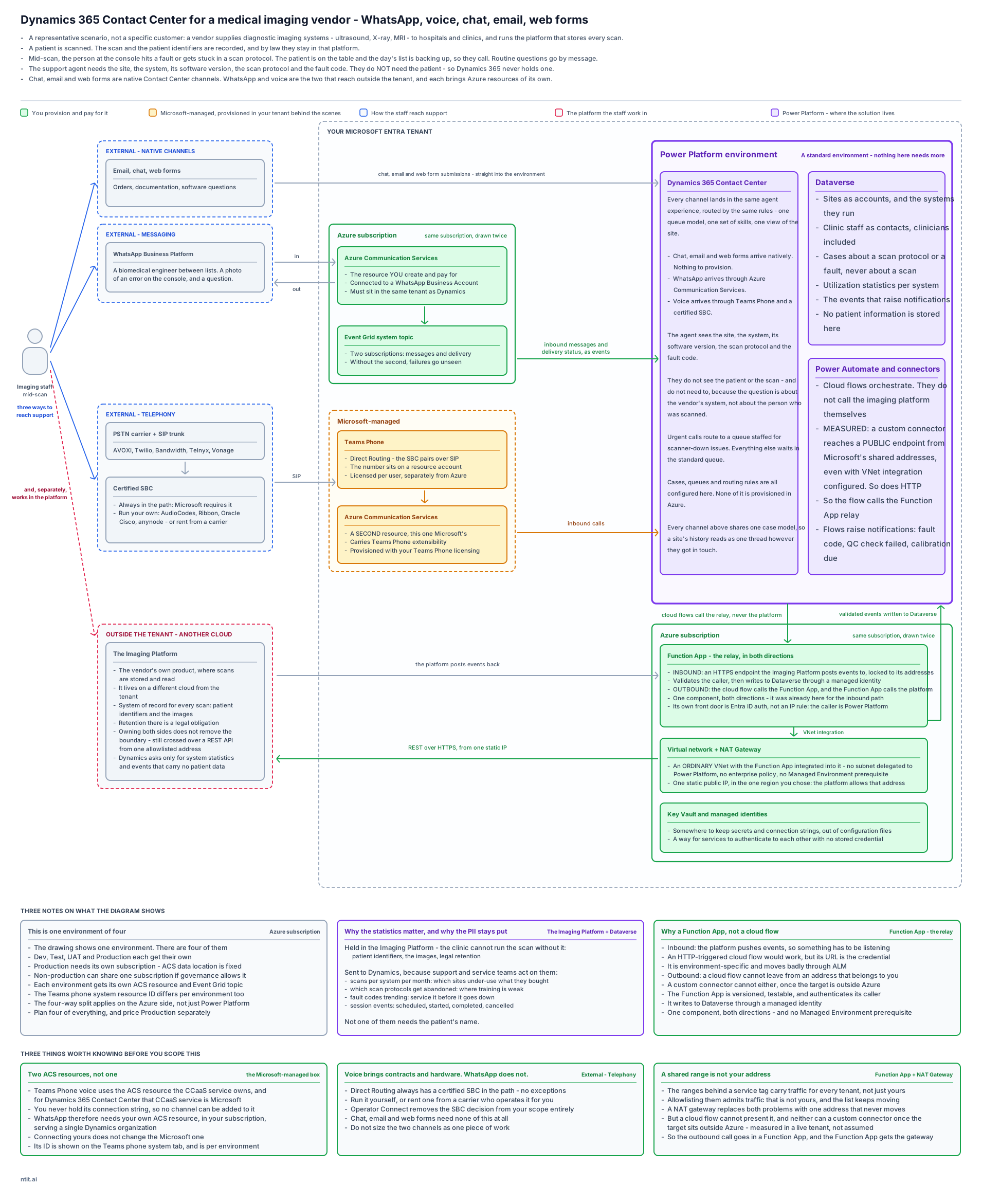
The business case
A vendor supplies diagnostic imaging systems - ultrasound, X-ray, MRI - to hospitals and clinics, and runs the platform where every scan is stored and read.
Three parties, and it matters which is which:
- The vendor supplies the systems and runs the imaging platform
- The sites, hospitals and clinics, are the customers here, and their staff are the ones who raise support cases
- The patients never contact support, and never appear in Dynamics at all
Picture where the support call comes from. A patient is halfway through a scan. The person at the console hits a fault code, or gets stuck partway through a scan protocol. The day’s list is backing up behind them, so they call. The routine questions - a software version, a consumable, a booking - go by message instead.
What the agent on the other end needs is narrower than it first sounds:
- The site, the system, its software version, the scan protocol and the fault code
- Utilization statistics per system - volumes and trends, never individuals
- Event notifications when something needs attention, carrying no patient data
- Those events routed into support and service queues like any other work
Not one of those needs the patient’s name.
The constraint on what Dynamics holds
Dynamics 365 holds no patient data. None of it.
Say it in the first meeting rather than the fifth. Four things follow from it:
- The imaging platform stays the system of record for the images and the patient identifiers, and retention there is a legal obligation
- Dynamics receives statistics and events, and nothing that identifies a person
- A case is about a scan protocol or a fault. It is never about a scan
- An agent sees that something happened, not what it contained. If they need the detail they go to the platform that owns it, under its own controls
Voice is where that boundary gets tested. A data model can be designed so there is nowhere to put a patient. A conversation cannot. The operator at the console, mid-scan with the list backing up, may well say a name out loud, and nothing in the architecture stops them. So the boundary has to hold where the conversation is stored, not only where the data model is drawn:
- Call recording and transcription stay off, and turning either on is a decision with a named owner rather than a channel setting somebody enables while configuring voice
- If the business genuinely needs recording, its storage location and retention join the regulated estate. They do not inherit Contact Center’s defaults
- The same applies to AI summarization of conversations. A summary of a call is a new record derived from what was said in it, and it lands where the platform puts it
- The case form gives an agent nowhere to record a patient. Designing the field out is worth more than asking people not to use one
That last point is the general rule. A boundary held by training degrades. A boundary held by the absence of a field does not.
The trap is that the vendor owns both sides. It is their product and their Dynamics tenant, so it feels like one estate and the boundary feels optional. It is not - owning both ends of an integration does not make the regulated data yours to move. The line is still crossed over an API, from one allowlisted address, and it is cheap to design in and expensive to retrofit after somebody has copied a table across.
The challenges
Two inbound channels that look symmetrical and are not
Sizing them as one piece of work is the mistake. They are nothing alike.
- WhatsApp: over the internet from Meta. Nothing in the message path but HTTPS - no carrier, no SIP trunk, no hardware
- It still needs a phone number to register the Business Account. Not bought from Azure, and it never carries a call
- Voice: over the PSTN. Carrier, SIP trunk, and a certified Session Border Controller in the path, every call, permanently
The imaging platform lives on another cloud
- It is the vendor’s own product, but it does not run in the Azure tenant, so Power Platform has to call out to it over the public internet
- The straightforward answer - allowlist the address ranges Power Platform calls out from - is a weak control
- That tag covers Microsoft’s shared Power Platform infrastructure for every tenant, not just yours
- Which means the platform would be admitting traffic from anyone’s environment
- There is a documented fix for this. The obvious way to apply it turned out not to work, which is a post of its own
One Azure resource turns out to be two
- I had assumed a single Azure Communication Services resource would serve both channels
- It does not, and I will come back to this
The solution design
One decision sits above the rest, and it is worth stating before any of the detail:
Use the Microsoft platform for as much of this as it can genuinely do, and bring in another vendor’s SaaS only where it cannot.
- Dynamics 365 Contact Center handles the contact center workload itself, rather than surfacing a separate platform inside it
- The channels use the platform’s own plumbing. Azure Communication Services for messaging, Teams Phone for voice
- A third-party SaaS or ISV enters the design only where the platform genuinely does not reach. When one does, that is a named decision with an owner, not a default
- This is not vendor loyalty. Every additional SaaS in the path brings another identity model, another data-residency question, another support boundary and another renewal. In a regulated setting it also adds one more place the data boundary has to be argued from scratch
That principle is what produces the split below. The Lego is everything the platform already does. The Meccano is what is left when it genuinely cannot reach.
Lego - the pieces that click
- Azure Communication Services connects to a WhatsApp Business Account and relays messages into Contact Center
- Event Grid system topic carries those messages to Dynamics, with two event subscriptions - inbound messages and delivery status
- Teams Phone with Direct Routing carries voice into the same Contact Center
- Unified routing puts both into one agent experience, one queue model, one view of the customer
- Power Automate orchestrates the outbound request - when it goes, and what is in it
- Key Vault and user-assigned managed identities remove stored credentials from the picture
Meccano - the two edges you fabricate
- Carrier → SBC → Teams Phone. Three vendors, three contracts, and a certified device in the middle
- Cloud flow → Function App → NAT Gateway → imaging platform. A small relay you write and own, on a virtual network you own, behind one static public IP
That second joint is worth the effort for a reason that helps the platform side as much as it helps the CRM side:
- The platform allowlists one address that belongs to the CRM
- Not a range shared by every tenant on that infrastructure, which they would also have to keep re-reading as Microsoft revises it
- It narrows the opening on both sides of the conversation
The relay is also the piece I got wrong first. My original design had the cloud flow call the imaging platform directly through a custom connector, with Power Platform’s own virtual network support supplying the address. It reads correctly, it does not behave that way, and I only know that because I measured it - written up in The Custom Connector Trap.
One thing the relay is not: a second component. The Function App was already in the design - the imaging platform publishes events back, and something has to be listening for them. Giving it the outbound direction as well means one thing to build, deploy and own, in both directions.
Three things I would want to know before scoping this
1. There are two ACS resources, and only one is yours
This is the piece I had wrong, and I had written the wrong version into a design document before checking it in a real environment.
- Voice over Teams Phone runs on an ACS resource Microsoft provisions and manages
- The one you create and pay for is the WhatsApp one
- Connecting your own resource does not change the Microsoft one - I verified this by ending a trial, connecting an own resource, and re-checking the value afterwards
- The practical claim survives - you still request and manage one Azure resource, because Microsoft’s is provisioned with your Teams Phone licensing rather than requested separately - but “one resource serves both” is not true
The documentation is explicit once you find the right page. Teams Phone extensibility provisioning says the Teams admin assigns “the Azure Communication Services Resource ID used by the CCaaS service” - and for Dynamics 365 Contact Center, that CCaaS service is Microsoft. Configure Teams Phone in voice channel has you read that ID off the Teams phone system tab rather than choose one.
Meanwhile Configure a WhatsApp channel through Azure Communication Services requires a resource you own - you supply its name, its Event Grid app registration and its connection string, and confirm it serves a single Dynamics organization.
That last detail is the one that settles it. You never hold a connection string for Microsoft’s resource, so there is no mechanism by which a channel could be added to it. They are not the same resource and cannot be made into one.
2. Voice brings contracts and hardware. WhatsApp does not
There are three ways to get PSTN into Teams Phone, and they carry very different amounts of scope. Least to most:
- Calling Plans. Microsoft is the carrier. No SBC, no third-party contract, nothing to operate. The trade is geography: it only works where Microsoft sells numbers for your countries, and number porting has its own timeline
- Operator Connect. You pick a carrier from Microsoft’s list inside the Teams admin center, and they own the SBC and the peering. The trade is a shorter list of carriers to choose from
- Direct Routing. A certified SBC is always in the path, and that part is a Microsoft requirement rather than a choice. Whether you run it yourself or rent one from a carrier who operates it for you is commercial
- WhatsApp needs none of the three. No SBC, no carrier, no extra contract
Calling Plans is the only option that brings neither a contract nor hardware, so it is the one to test first rather than assume away. Whether it is open to you is a coverage question, not an architecture one - and answering it late is how a build acquires an SBC it did not need to.
I would flag all of this early, because “add voice and WhatsApp” reads like one line item and behaves like two very different pieces of work.
3. The outbound call cannot come from a cloud flow
The imaging platform will only accept traffic from an allowlisted address, so the design needs one address that belongs to us rather than a shared range that carries every tenant’s traffic.
- Power Platform has virtual network support, and custom connectors are on its supported list
- So a cloud flow calling out through a custom connector should present that address
- It does not. Measured in my own tenant: the plug-in egressed through the NAT Gateway, the custom connector and the HTTP action both left from Microsoft’s shared addresses
- The list says what can run in the delegated subnet. It says nothing about where internet-bound traffic leaves from
That is why the outbound joint is a Function App rather than a flow, and it is the one thing here I would not have caught by reading. The full test, the numbers and the two ways to fix it are in a separate write-up: The Custom Connector Trap.
On environments
Each environment gets its own Power Platform environment. Production needs its own Azure subscription regardless, and for a reason that is easy to miss:
- The ACS data location is set once, at creation
- It cannot be changed afterwards
- Getting it wrong means rebuilding the resource, not editing a setting
Which was which
Looking at the finished picture, the split is clear enough:
| Lego | Meccano |
|---|---|
| ACS ↔ Contact Center | Carrier ↔ SBC ↔ Teams Phone |
| Event Grid ↔ ACS | Cloud flow ↔ Function App ↔ NAT ↔ imaging platform |
| Managed identities ↔ Key Vault |
The Lego is most of it, and that is the good news - far more of this platform snaps together than used to.
But the Meccano is where the estimates live. Both of the fabricated joints here carry recurring cost, another vendor, and an operational owner. Neither is visible in a feature list. Both are obvious in a drawing.
One deliberate omission: licensing. Contact Center seats, Teams Phone per user, PSTN minutes and WhatsApp conversations are all real money, and on many builds they are the larger number. There are no figures here on purpose. They move with headcount, geography and volume, they change faster than a post does, and they are the same for anybody building this. The two joints above are the part that varies with the architecture rather than with the org chart, which is why they are the part worth drawing.
Which is really why I draw these before I write anything down: the picture makes you say out loud which pieces you think are bricks. If one of them turns out to need a spanner, better to find that on a whiteboard than in a sprint.
Though the connector is the case the drawing could not have caught. It looked like a brick, and the documentation listed it as one. It only turned out to need a spanner when I put a meter on it. That is the argument for building the awkward joint early, in a sandbox nobody is depending on, rather than trusting the parts list.
Method, sandbox and sources
The architecture came from reading the documentation, then testing it. Whatever could be checked was checked in a sandbox of my own: an Azure Communication Services resource provisioned for real, a Power Platform environment with Dataverse, subnet delegation, an enterprise policy and a NAT Gateway. The two-ACS finding and the static IP measurement both came out of that setup.
The Lego and Meccano framing is mine, and it was the brief I gave an AI workflow to draft against. It rephrased, sharpened and cut length. The pushback mostly came from me: a mixed metaphor, a claim about carriers that was too absolute, a headline that promised the wrong thing. The decisions, the tests and the conclusions stayed mine, and where the writing and the sandbox disagreed, the sandbox won.
Sources
| Topic | Source |
|---|---|
| Which ACS resource Teams Phone voice uses | Teams Phone extensibility provisioning |
| Reading that resource ID off the Teams phone system tab | Configure Teams Phone in the voice channel |
| The ACS resource you provision yourself, and its connection string | Configure a WhatsApp channel through Azure Communication Services |
| PSTN connectivity options for Teams Phone | Teams Phone PSTN connectivity options |
| The outbound static IP measurement, in full | The Custom Connector Trap |
#Dynamics365 #ContactCenter #CCaaS #AzureCommunicationServices #TeamsPhone #WhatsApp #PowerPlatform #Architecture #NordTekIT