The Custom Connector Trap: A Cloud Flow Won't Leave From Your Static IP
... what does, what it costs, and how I found out
A requirement that turns up on most integration designs sooner or later:
The API we call will only accept traffic from an allowlisted address. Give them one address that belongs to us.
Reasonable, common, and on Power Platform it has a documented answer. That answer did not work, and finding out why took a NAT Gateway, a plug-in and an IP-echo endpoint.
One address, not a published range
The first thing anybody suggests is the service tag. Worth being precise about it, because the loose version of this argument does not hold up.
- Microsoft publishes the ranges behind its service tags, as a regularly published JSON download and a discovery API, so they can be consumed from outside Azure
- The problem is not that they cannot be used. It is that those ranges carry traffic for every tenant on that infrastructure, so allowlisting them admits traffic that is not yours
- And Microsoft revises them on its own schedule, so whoever administers that firewall inherits a list they have to keep tracking, indefinitely
- A NAT gateway replaces both problems with one address that is only yours, and does not move
- One caveat in the other direction: a NAT gateway makes the source address predictable. It does not make the path private. Traffic still crosses the public internet
So the argument for wanting a single static address holds. The rest of this post is about the first way I reached for it, which did not.
The documented answer
Power Platform has virtual network support. Delegate a subnet, attach a NAT Gateway, and outbound traffic leaves from one address you own.
The white paper’s integration patterns list what is “generally available for use in a virtual network”:
- Dataverse plug-ins
- Custom connectors
- Azure Blob Storage, Azure File Storage, Azure Key Vault, Azure Queues, Azure SQL Data Warehouse, HTTP with Microsoft Entra ID (preauthorized), SQL Server
Custom connectors, second on the list, directly under plug-ins. So a cloud flow calling an external API through a custom connector should leave from your address.
I wrote that into a design document. Then I built it in my own tenant and measured it.
The measurement
One Power Platform environment. One endpoint, a public IP-echo service. Three ways of making the request, with the NAT Gateway attached and the delegation, the enterprise policy and the environment link all verified first.
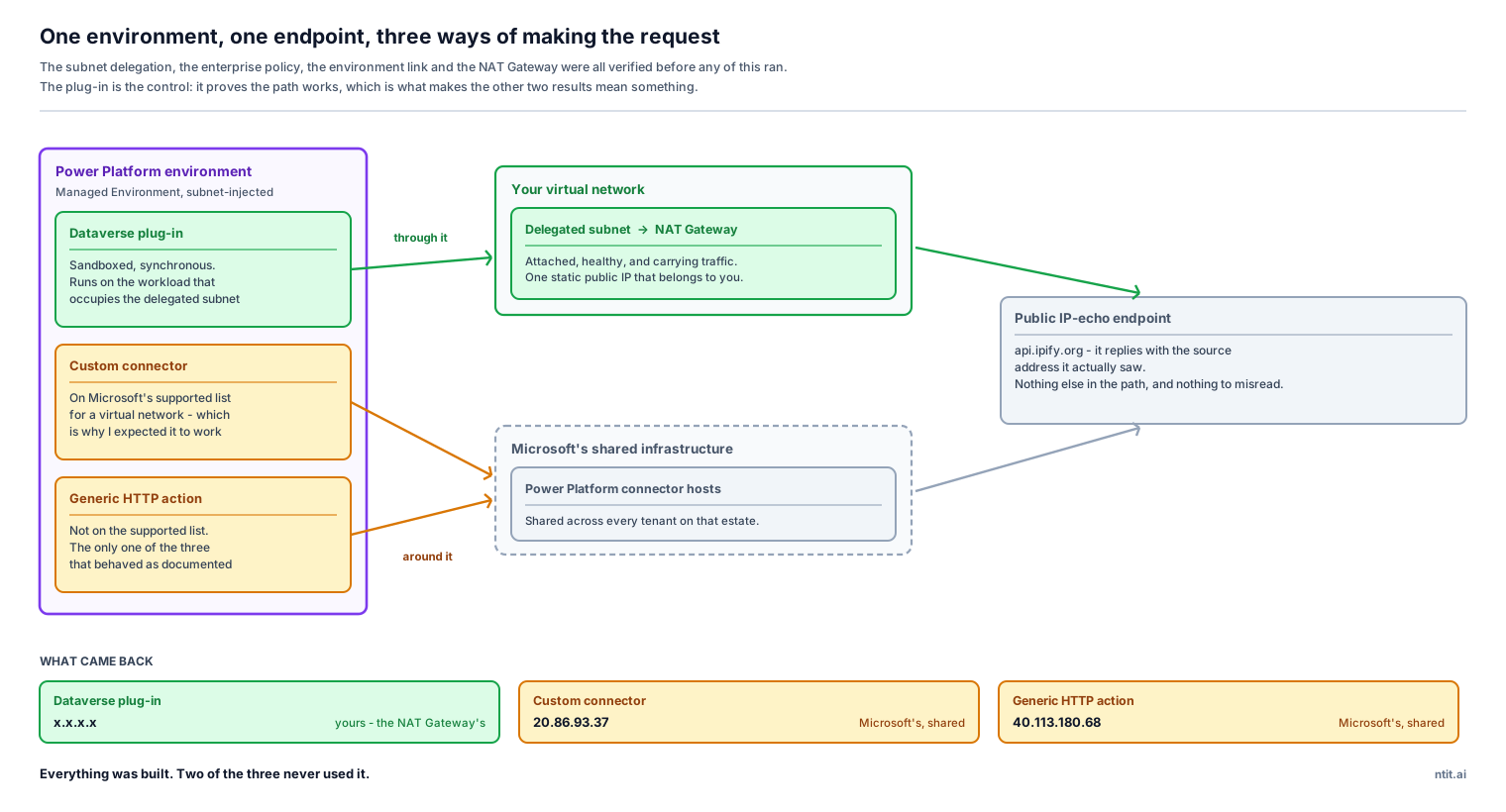
| What made the request | Source address it reported | Whose address that is |
|---|---|---|
| Dataverse plug-in | x.x.x.x | mine - the NAT Gateway’s |
| Custom connector | 20.86.93.37 | Microsoft’s, shared |
| Generic HTTP action | 40.113.180.68 | Microsoft’s, shared |
Measured 26 August 2026, against the white paper as it read that day. Both the documentation and the behavior are Microsoft’s to change. The test is cheap to repeat: two actions in one cloud flow and a plug-in, all three calling a public IP-echo endpoint.
The plug-in is the control, and it is what makes the result trustworthy. Something in that environment does egress through the gateway, so the policy, the delegation, the subnet and the environment link are all correct. This is not a misconfiguration. The custom connector, calling the same URL in the same run, still leaves from Microsoft’s shared infrastructure.
It is not a warm container that predated the gateway either. The platform’s own workload telemetry shows only the sandbox workload has ever occupied that subnet, and the result did not move after a fresh connection, a cache-busting parameter and a long wait.
What works instead
- Target in Azure and privately reachable: a custom connector is the right piece, and the subnet does its job. This is the scenario the documentation was written for
- Target on the public internet: only a Dataverse plug-in egresses through the gateway. A cloud flow does not, with or without a custom connector, and the generic HTTP action never did. For a custom connector the deciding factor is where the target lives, not the fact that it appears on the list
So the outbound call has to move. There are two places it can go.
| Dataverse plug-in | Azure Function App relay | |
|---|---|---|
| Static egress IP for a target outside Azure | yes, measured | yes |
| Needs Power Platform Virtual Network support | yes | no |
| Needs a Managed Environment and an enterprise policy | yes | no |
| Extra Azure compute | none | a Function App |
| Where the pro-code lives | inside Dataverse | in Azure |
| Timeout ceiling | the plug-in sandbox | configurable |
The plug-in is the smaller change if you already run a Managed Environment with virtual network support. If you do not, that prerequisite is most of the work, and it is a lot of platform machinery to stand up for one outbound call.
The relay is the smaller change otherwise, and it gets much smaller if something in the design is already listening on an HTTPS endpoint. Give that same component the outbound direction and it is one thing to build, deploy and own, in both directions. The trade is that the flow now calls your relay rather than the target, so the relay needs its own front door - Entra ID authentication rather than an IP rule, because the caller is Power Platform’s shared address space.
Where the misreading comes from
Going back to the page afterwards, that bullet is the only thing on it that supports the reading I took. Everything around it is scoped inward:
- a connector workload accesses “the target resource or endpoint inside the same virtual network”
- the use case is headed “Private endpoints for connectors”
- the pattern exists to “integrate them securely with data sources inside your network”
- every real-world example is about connecting to private data sources
Nowhere does the page say that an outbound call to a public endpoint leaves through the subnet.
It is a list of what can run in the subnet. I read it as a promise about where internet-bound traffic leaves from. Those are different claims, and collapsing them is the trap.
The same page describes the baseline behavior plainly, in a note about next hops:
If only configuring network security groups, without configuring the next hop… internet-bound traffic will still egress from Power Platform owned IP addresses.
Forward Forever’s setup guide states the rule outright - custom connectors use the integration only when the target is in Azure - and predicted my result before I found it.
The wording I would now use
For anyone whose standard is low-code first with pro-code as a justified exception, this is the measurement that names the exception:
Outbound calls to the target API must originate from an allowlisted static address. A cloud flow using a custom connector egresses from Microsoft’s shared Power Platform addresses when the target is outside Azure. Only a Dataverse plug-in, or a relay you host yourself, egresses from an address you control.
The broader lesson is smaller and more annoying than the networking. A supported list tells you what can run somewhere. It does not tell you what that changes. Those are worth reading as two separate claims, and where the difference has a cost attached, worth measuring before it reaches a design document.
Method, sandbox and sources
Everything above was built and measured in a sandbox of my own: a Power Platform environment with Dataverse, subnet delegation in both regions of the pair, an enterprise policy, a NAT Gateway with a static public IP, and a synchronous Dataverse plug-in as the control. The drafting and sharpening happened in conversation with an AI workflow. The tests and the conclusions are mine, and where the writing and the sandbox disagreed, the sandbox won.
| Topic | Source |
|---|---|
| What runs inside a delegated subnet, and the integration patterns list | Virtual Network support white paper |
| Scope of Virtual Network support, and supported regions | Virtual Network support overview |
| Standing the sandbox up: policy, delegation, environment link | Set up Virtual Network support |
| The custom connector caveats, including the Virtual Network section | Custom connectors overview |
| How a NAT Gateway becomes the next hop for outbound traffic | Azure NAT Gateway |
| The delegation mechanism the whole thing rests on | Azure subnet delegation |
| The target-in-Azure rule, stated plainly and ahead of my own result | Forward Forever: setting up Power Platform VNet integration |
| The relay pattern, and why a Function App over API Management | Forward Forever: reaching non-Microsoft resources from a static IP |
The design this came out of is a Dynamics 365 Contact Center build beside a regulated platform on another cloud, which is written up separately in A D365 Contact Center Build: Voice & WhatsApp.
#PowerPlatform #PowerAutomate #Azure #VNet #CustomConnectors #Dataverse #Networking #Architecture #NordTekIT